TweleTwele
Buy together. Save more.
A community platform that helps people nearby find each other and organise together: group buying, NYSC camp pairing, housemates and rent sharing, and group travel.
- Marketplace
- Community
Coming Soon

Navigation / Utility
Know what's around you.
A simple location utility that helps users understand their current location and quickly discover useful nearby places and services.
Available onAndroid
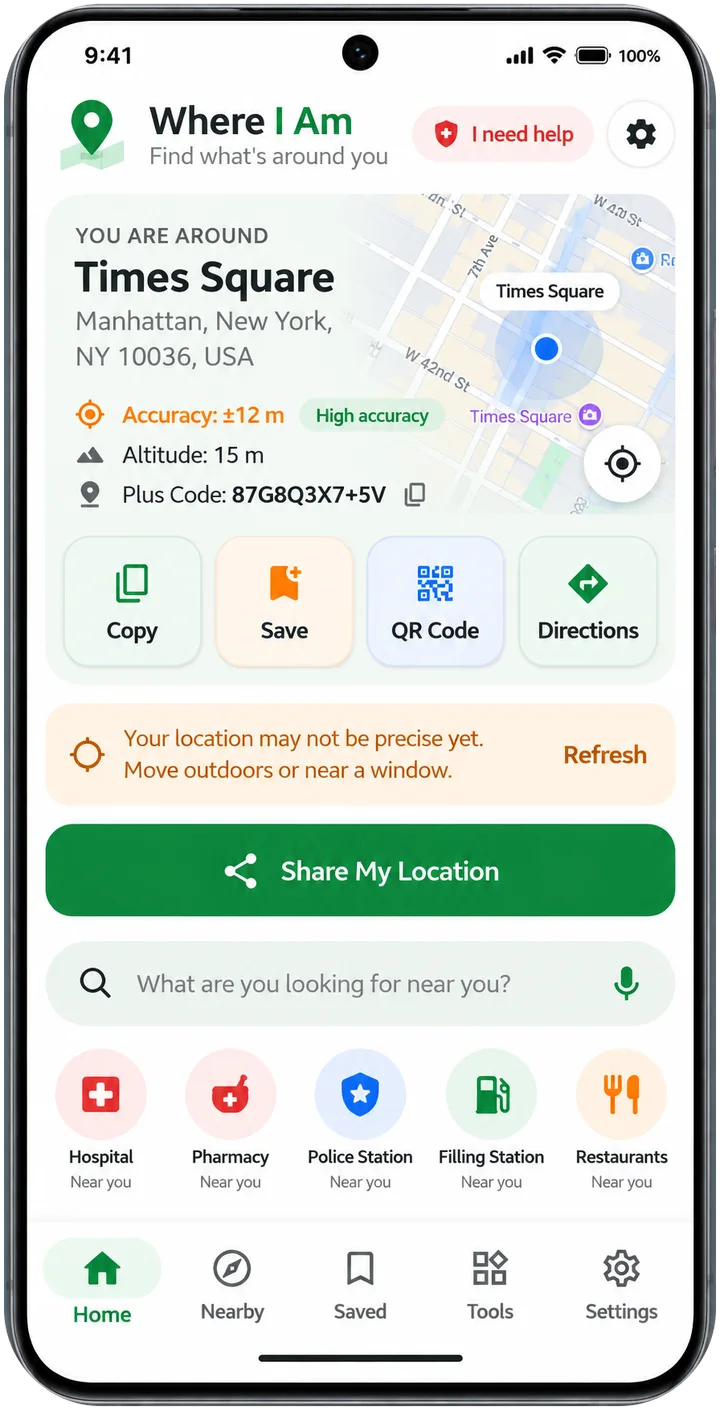
Where I Am answers one question: “Where am I right now?” It turns your phone’s GPS into a place name people understand, with the nearest landmark, then lets you share it, copy it, save it or turn it into a QR code.
It also finds what is around you, hospitals, pharmacies, fuel, food and more, and has an “I need help” screen with your location and the nearest emergency services. There is no account and no background tracking.
Know where you are
Area name, accuracy, Plus Code and the nearest landmark, such as “About 150 m east of the filling station”.
Share your location
Send it as a message or link, with landmarks to help people find you, or as one short SMS when there is no data.
Live location
Share your live location for 15 minutes, 1 hour or 8 hours. Friends open a link and watch you move; a notification with Stop stays on the whole time.
Near me
Search places or tap everyday categories such as hospital, pharmacy, police, fuel, ATM, food and worship. See distance, walking or driving time, address, and whether a place is open when its hours are published.
I need help
Your readable location, coordinates and Plus Code to copy or share, the nearest hospital, police and fire services, and 112. Calls start only after you tap.
Saved places, parking and meeting points
Save a place with a photo, remember where you parked, or set a meeting point.
QR codes and widget
Turn any location into a QR code, and open “Share My Location” from a home-screen widget.
Private share mode
Round a shared link to about 1 km and leave out the street, landmark and exact coordinates.
No. It reads your location once when you open the app, when you return to it after a minute, or when you tap refresh. The only exception is live sharing, which you start yourself and which shows a notification with a Stop button until it ends.
Only your latest position for that share, which is removed when you stop sharing. Expired shares are deleted. The link contains a random code and only people who have it can watch.
Place data comes from open and commercial map sources and is strongest in large cities. A place is shown as open only when its published hours say so; places without hours are never marked open.
Your location, coordinates, Plus Code, saved places, QR codes and sharing work anywhere your phone has a GPS fix. Place names, landmarks and nearby search come from open and commercial map sources, so coverage varies by country and is best in large cities. The app is in English for now.
Yes, partly: you still see coordinates and accuracy and can copy, save, make a QR code or send an SMS. Place names, nearby search and live sharing need a connection.
No. Every call opens your phone’s dialler and starts only after you tap it. Emergency numbers differ between countries, so always check the number is right for where you are.
Delete them inside the app, or uninstall it. Saved places, parking spots, photos and recent shares are stored only on your phone.
Buy together. Save more.
A community platform that helps people nearby find each other and organise together: group buying, NYSC camp pairing, housemates and rent sharing, and group travel.
Find any screenshot in seconds.
Search, analyse and take action on information stored across thousands of screenshots — including text, links, places and other useful content.
Take control of unwanted calls and messages.
A practical Android utility designed to help users identify and block unwanted calls and SMS using flexible blocking rules.
Our team is happy to help with support, partnerships and business enquiries.