
TweleTwele
Buy together. Save more.
A community platform that helps people nearby find each other and organise together: group buying, NYSC camp pairing, housemates and rent sharing, and group travel.
- Marketplace
- Community
Coming Soon

Productivity / Utility
Find any screenshot in seconds.
Search, analyse and take action on information stored across thousands of screenshots — including text, links, places and other useful content.
Available onAndroid
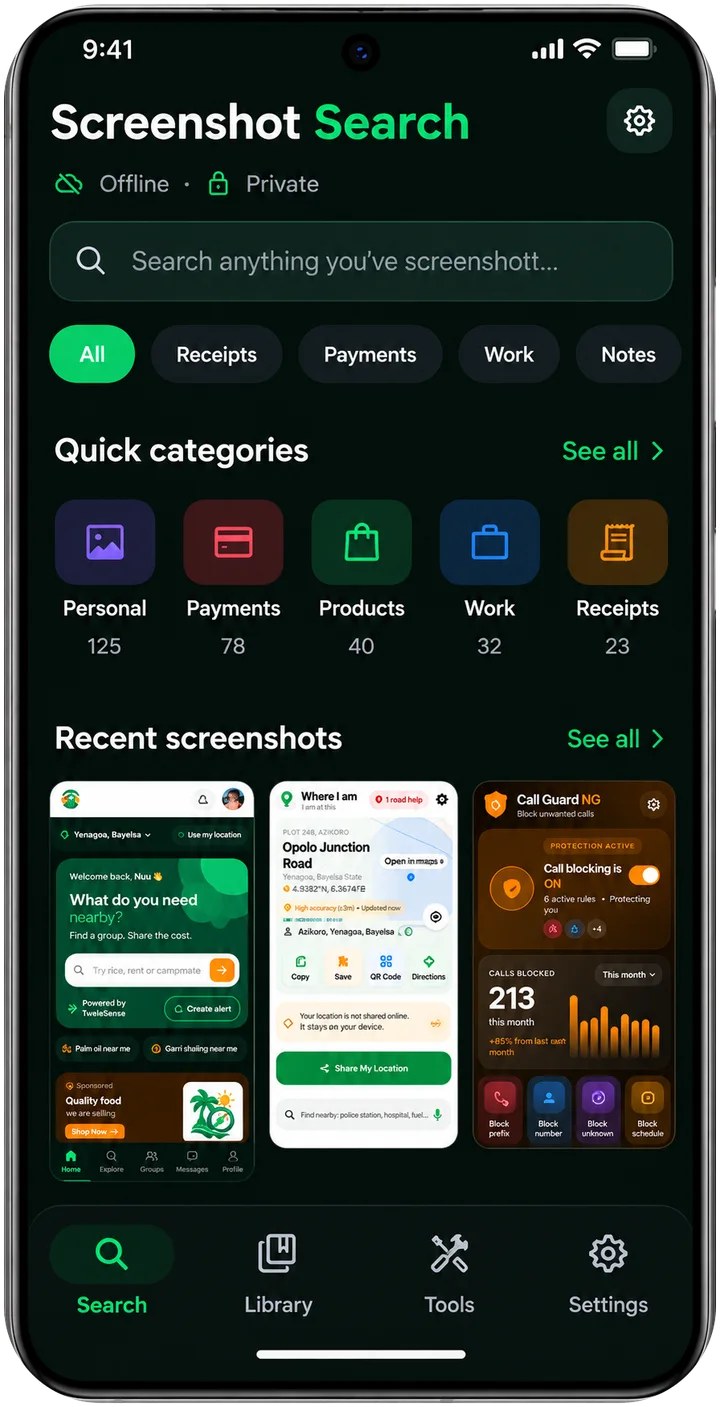
SHOTDEX — Screenshot Search turns the screenshots piled up on your phone into something you can search. It reads the text in every screenshot, recognises phone numbers, links, amounts, dates and addresses, and lets you ask for things in plain words, such as “receipts over 5,000 from last month”.
Everything is done on your phone. SHOTDEX has no internet permission, so your screenshots, the text read from them and your searches can never leave the device.
Search by what is written
Finds screenshots by the words inside them, and by what the picture shows, such as a shoe, a laptop or food.
Natural-language search
Type “bank alerts this week” or “addresses in Lagos” and SHOTDEX works out what you mean.
Actions in one tap
Call a number, send an email, open an address in Maps, add a calendar entry or search the web from the details found in a screenshot.
Memory timeline
Browse your screenshots by day, week and month, grouped into things like receipts, chats and travel.
Tasks and reminders
Turn a screenshot into a task and be reminded at the time you choose, including repeating reminders.
Money summary
Adds up the amounts found in your screenshots, per currency, without converting between currencies.
Ask
Ask a question about your screenshots and get an answer worked out on the phone, never sent to a server.
Related screenshots
Open a screenshot and see others from the same conversation, order or place.
App lock and widgets
Lock the app with your fingerprint, face or screen lock; search from a home-screen widget, quick-settings tile or app shortcut.
Four languages
English, French, Portuguese and Spanish. It follows your phone’s language and you can change it in Settings.
No. The app has no internet permission, so it cannot send your screenshots, the text read from them or your searches anywhere.
No. There is nothing to sign up for.
To find your screenshots and read the text in them. You can allow access to only some photos, or turn it off in Android settings; search then covers only what the app can read.
Yes. Use “Remove from SHOTDEX” on any screenshot to hide it from search without deleting it, or exclude whole folders in Settings.
No. Text recognition and the details it finds are worked out automatically and can be wrong or incomplete. Check the original screenshot before relying on a detail such as an amount, an account number or a deadline.
Reminders depend on your phone’s battery optimisation and notification settings. Allow SHOTDEX to run unrestricted and allow alarms and notifications for the app.
Use “Clear search data” in Settings, or uninstall the app. Either removes everything the app stored on your phone.
Buy together. Save more.
A community platform that helps people nearby find each other and organise together: group buying, NYSC camp pairing, housemates and rent sharing, and group travel.

Take control of unwanted calls and messages.
A practical Android utility designed to help users identify and block unwanted calls and SMS using flexible blocking rules.
Know what's around you.
A simple location utility that helps users understand their current location and quickly discover useful nearby places and services.
Our team is happy to help with support, partnerships and business enquiries.